Once you build a Docker image, you need somewhere to store it so that your deployment services — ECS, EKS, Lambda, or EC2 — can pull and run it.
Amazon Elastic Container Registry (ECR) is AWS's fully managed private container registry. It is the standard place to store your Docker images when working within AWS.
What is Amazon ECR?
ECR is a private Docker registry hosted inside your AWS account. It stores your container images securely, controls access through IAM, and integrates natively with every AWS service that runs containers.
Think of ECR as S3 for container images — a managed, scalable storage service where images live until they are needed.
Key Concepts
1. Repository: A repository in ECR is a collection of related container images — typically all versions of one application. For example, you might have one repository called my-app-backend that stores every version of your backend service ever built.
Each repository has a unique URI that looks like this:

This URI is what you use to push images to and pull images from ECR.
2. Image Tags: Every image pushed to ECR gets a tag — a label that identifies the version. Common tagging strategies:
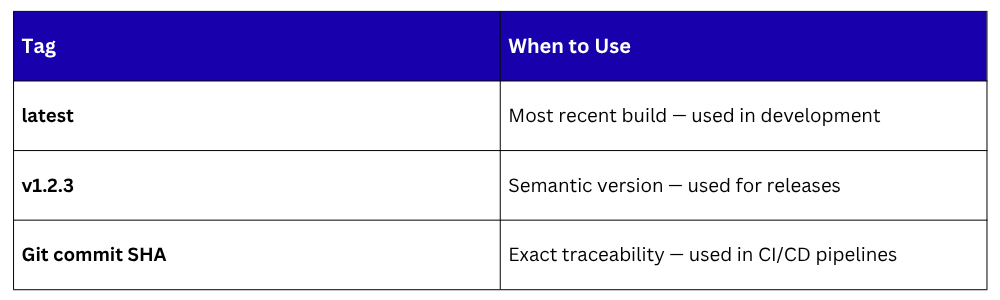
In production, always use a specific version tag — never latest. Using latest means you cannot reliably trace which version of your application is running.
3. Image Lifecycle Policies: Over time, your repositories fill up with old, unused images. ECR lifecycle policies automatically delete images based on rules you define — keeping only the last 10 versions, for example, or deleting untagged images after 7 days.
This keeps storage costs low and repositories clean without manual cleanup.
How ECR Fits Into a CI/CD Pipeline
ECR sits between your build stage and your deployment stage. The CI/CD pipeline builds the image, pushes it to ECR, and then the deployment service pulls it from ECR to run.
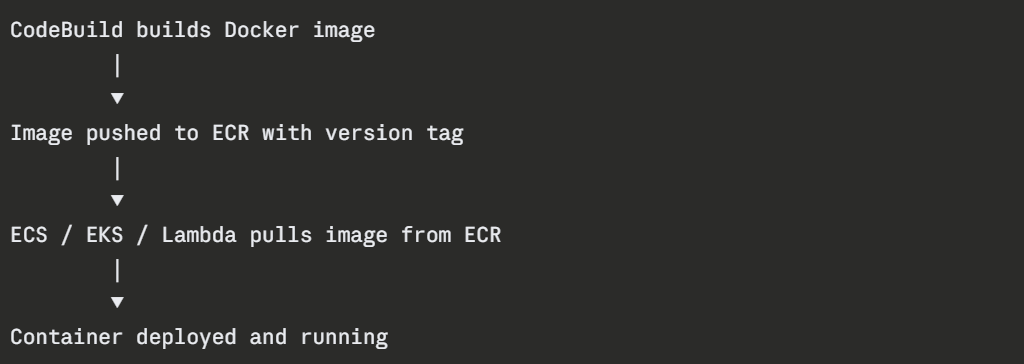
This flow ensures that the exact image tested in CI is the same image deployed in production — no rebuilding, no discrepancies.
Authentication
Before pushing or pulling images, your environment must authenticate with ECR. AWS handles this through the AWS CLI — it generates a temporary authentication token valid for 12 hours.

In a CI/CD pipeline running on AWS infrastructure — CodeBuild or an EC2 instance with an IAM role — authentication is handled automatically through the instance role. No credentials need to be stored or managed manually.
ECR Security Features
1. IAM Access Control: All access to ECR is controlled through IAM policies. You define who can push images, who can pull images, and which AWS services can access which repositories. This keeps your images private and access tightly controlled.
2. Image Scanning: ECR has a built-in vulnerability scanner. When enabled, it automatically scans every image pushed to the repository for known security vulnerabilities — CVEs — and reports the findings in the AWS Console. You can also configure the pipeline to fail if critical vulnerabilities are found.
There are two scanning modes:
Basic scanning: Scans on push using the open-source Clair scanner.
Enhanced scanning: Continuous scanning powered by Amazon Inspector, with more detailed findings and automatic re-scanning when new vulnerabilities are discovered.
3. Encryption: All images stored in ECR are encrypted at rest using AWS KMS. Data in transit between ECR and your services is encrypted using TLS.
4. Immutable Tags: ECR supports immutable image tags — once an image is pushed with a specific tag, that tag cannot be overwritten. This prevents accidental or malicious replacement of a known-good image version.
ECR Public Gallery
In addition to private repositories, ECR also has a public gallery — gallery.ecr.aws — where AWS and community contributors publish public base images.
AWS publishes official images here for Amazon Linux, which is useful as a secure, AWS-optimised base image for your Dockerfiles.
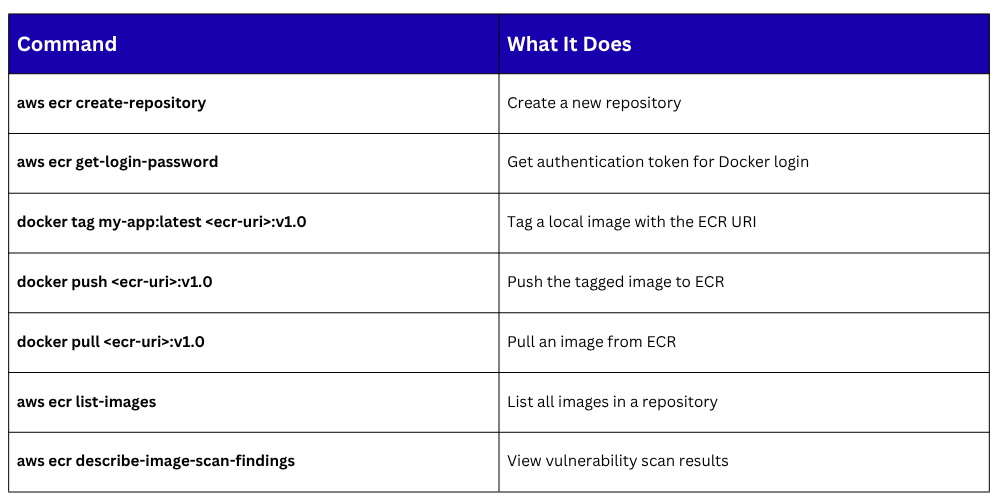
Key ECR Commands