Traffic is never perfectly predictable. A marketing campaign drives a sudden spike. A viral post sends unexpected load. Night-time traffic drops to a fraction of daytime levels.
Building an application that handles all of these scenarios, without over-provisioning expensive resources during quiet periods or under-provisioning during peaks.
It requires two capabilities working together: Auto Scaling to adjust capacity automatically, and Elastic Load Balancing to distribute traffic across that capacity. Together they are the foundation of resilient, cost-efficient applications on AWS.
Elastic Load Balancing
A load balancer sits in front of your application and distributes incoming traffic across multiple instances, containers, or functions. No single resource gets overwhelmed, and if one becomes unhealthy, the load balancer stops sending traffic to it automatically.
The Three Load Balancer Types
1. Application Load Balancer — ALB
Operates at Layer 7 — the HTTP/HTTPS level. It understands the content of requests and can route based on URL path, hostname, HTTP headers, and query strings.
This makes it the right choice for web applications, REST APIs, and microservices where different paths route to different backend services.
1. Routes /api/* to one target group and /static/* to another.
2. Supports WebSockets and HTTP/2.
3. Integrates with AWS WAF for application-layer security.
4. The most commonly used load balancer for modern applications.
2. Network Load Balancer — NLB
Operates at Layer 4 — the TCP/UDP level. It handles millions of requests per second with ultra-low latency.
Use it when performance is the primary requirement and you do not need content-based routing. Common for real-time gaming, financial trading systems, and IoT applications.
3. Gateway Load Balancer — GWLB
Designed for deploying, scaling, and managing third-party network appliances — firewalls, intrusion detection systems. Primarily used by network security teams rather than application teams.
Target Groups
A target group is a collection of resources that a load balancer routes traffic to — EC2 instances, ECS tasks, Lambda functions, or IP addresses. The load balancer performs health checks on each target and only routes traffic to healthy ones.
Health check configuration matters. Set the health check path, interval, and threshold deliberately. A health check that is too aggressive removes healthy targets unnecessarily. A health check that is too lenient sends traffic to unhealthy targets for too long.
Auto Scaling
Auto Scaling automatically adjusts the number of running instances or tasks based on demand. When traffic increases, more capacity is added. When traffic decreases, excess capacity is removed. You pay for what you need, when you need it.
EC2 Auto Scaling
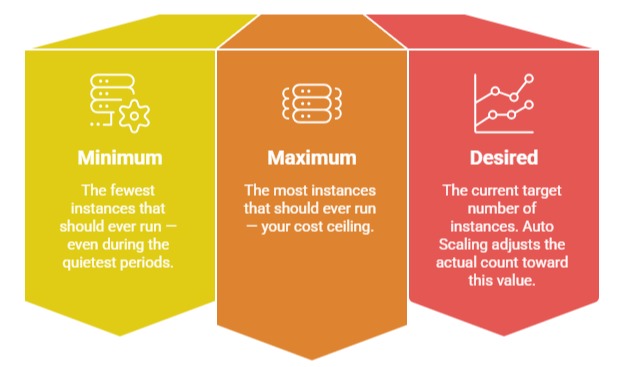
EC2 Auto Scaling manages a group of EC2 instances, called an Auto Scaling Group (ASG). You define three capacity values:
Scaling Policies
Auto Scaling uses policies to decide when and how to scale:
1. Target Tracking Scaling — Recommended: You define a target value for a metric — keep CPU utilisation at 60%, keep the number of requests per target at 1,000. Auto Scaling continuously adjusts capacity to maintain that target. This is the simplest and most effective policy for most workloads.
2. Step Scaling: Define thresholds that trigger different scaling actions. If CPU exceeds 70% add 2 instances. If CPU exceeds 90% add 5 instances. More granular than target tracking but requires more configuration.
3. Scheduled Scaling: Scale on a defined schedule, add capacity at 8am Monday to Friday when office workers come online, reduce it at 8pm. Use this when you know your traffic patterns in advance.
4. Predictive Scaling: Uses machine learning to forecast future traffic based on historical patterns and pre-provisions capacity before demand arrives. Eliminates the lag between a traffic spike arriving and reactive scaling completing.
ECS Auto Scaling
ECS services scale tasks, not instances using Application Auto Scaling. The same policy types apply — target tracking, step scaling, and scheduled scaling — but they control the number of running tasks rather than EC2 instances.
For Fargate, task scaling is all you need — AWS manages the underlying infrastructure. For EC2 launch type, you need both task scaling and cluster scaling via an ASG.
How They Work Together
ALB and Auto Scaling integrate natively. When Auto Scaling adds a new instance or ECS task, it registers it with the load balancer automatically. When it removes one, it deregisters it after completing in-flight requests before termination.
Traffic increases
│
▼
ALB distributes load across existing targets
│
▼
Auto Scaling detects metric threshold breached
│
▼
New instances or tasks launched
│
▼
ALB registers new targets — health checks pass
│
▼
Traffic distributed across expanded capacity
│
▼
Traffic decreases — Auto Scaling removes excess capacity
│
▼
ALB deregisters removed targets gracefully
The entire cycle is automatic. No human involvement needed.
Resilience Patterns
1. Multi-AZ deployment: Always deploy your Auto Scaling Group or ECS service across at least two Availability Zones. If one AZ has an outage, the load balancer routes traffic to instances in the remaining AZs automatically. Your application stays available.
2. Connection draining: When Auto Scaling removes an instance, the load balancer waits for existing connections to complete before the instance is terminated. This prevents in-flight requests from being cut off during scale-in events.
3. Warm-up period: Newly launched instances need time to initialise before they can handle traffic effectively. Configure a warm-up period in your scaling policy so new instances are not counted as healthy until they are ready — preventing premature traffic routing to cold instances.
Cost Efficiency Through Scaling
Auto Scaling does not just improve resilience, it directly reduces cost. Without it, you provision for peak load at all times — paying for maximum capacity even during off-peak hours. With Auto Scaling, you pay only for the capacity you currently need.
Combine Auto Scaling with:
1. Spot Instances for EC2-based workloads — up to 90% cheaper than On-Demand. Configure your ASG to use a mix of On-Demand and Spot Instances for cost-efficient resilience.
2. Savings Plans for the baseline capacity that always runs — commit to a minimum level of usage for significant discounts.
