Security checks that rely on humans — manual code reviews, periodic audits, end-of-sprint security sign-offs are inconsistent, slow, and easy to skip under deadline pressure.
Automated security scanning in the CI/CD pipeline removes this inconsistency by making security checks mandatory, repeatable, and fast.
Every code change is scanned automatically, and anything that introduces a critical vulnerability never reaches production.
The Four Types of Automated Security Scanning
Static Application Security Testing — SAST
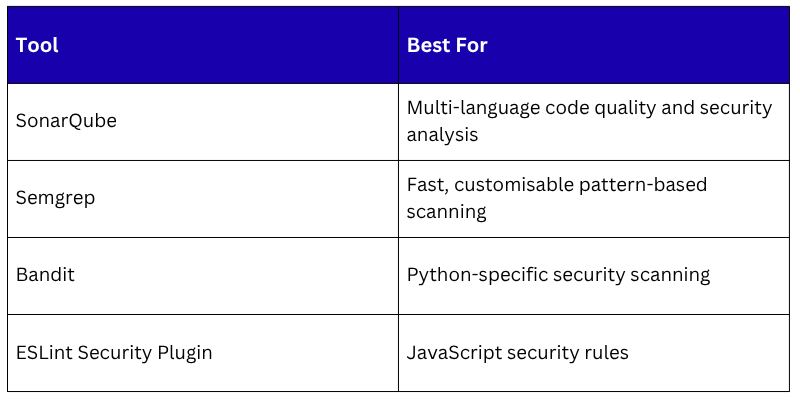
SAST analyses your source code without executing it. It looks for known vulnerability patterns — insecure functions, SQL injection risks, hardcoded credentials, improper input validation, weak cryptography.
SAST is fast because it does not need a running environment. It runs directly on your code files as soon as they are pushed. Critical findings fail the pipeline immediately.
Common SAST Tools:
Software Composition Analysis — SCA
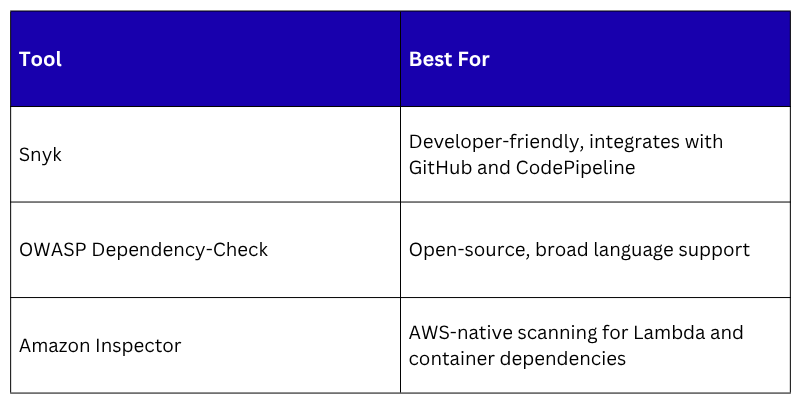
Modern applications depend heavily on open-source libraries. SCA scans your dependency files — requirements.txt, package.json, pom.xml — against databases of known vulnerabilities.
A library you installed six months ago may have had a critical CVE discovered last week.
SCA runs in the pipeline and fails the build if a dependency has a vulnerability above the severity threshold you configure.
Common SCA Tools
Infrastructure as Code Security Scanning
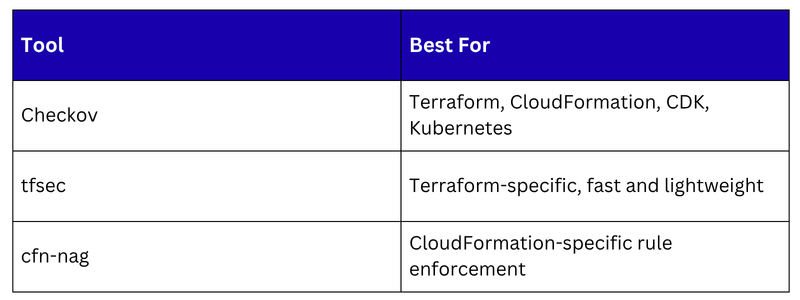
IaC files define real infrastructure. A misconfigured Terraform module or CloudFormation template can create publicly accessible S3 buckets, overly permissive security groups, or IAM roles with excessive privileges. IaC scanning catches these before the infrastructure is provisioned.
Common IaC Scanning Tools
Container Image Scanning
Container images bundle your application with its runtime and dependencies. A base image that was secure six months ago may now contain known vulnerabilities. Every image should be scanned before it is deployed.
Amazon ECR scanning, provides basic and enhanced scanning automatically on push. The pipeline should check scan results before proceeding to deployment:
1. If critical vulnerabilities exist in the image — block deployment.
2. If no critical vulnerabilities — proceed.
Amazon Inspector provides continuous scanning, not just at push time. If a new CVE is published that affects an image already running in production, Inspector detects and reports it automatically.
Where Each Scan Fits in the Pipeline
Security scans run at different points depending on what they are checking:
Code committed
│
▼
Pre-commit hook — secret scanning (Gitleaks)
│
▼
Pull request opened — SAST scan, SCA scan
│
▼
Pipeline triggered on merge
│
▼
Build stage — IaC security scan (Checkov / tfsec)
│
▼
Container build — ECR image scan
│
▼
All scans pass → Deploy to staging
│
▼
Amazon Inspector — continuous scanning in staging and production
Each scan has a natural home in the pipeline where it provides the most value with the least delay.
Severity Thresholds and Failure Policies
Not every vulnerability should fail the pipeline. Severity thresholds define which findings block deployment and which are reported but allowed through.
A Typical Policy
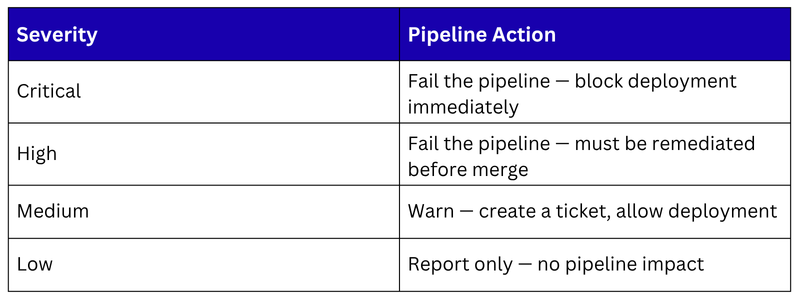
Define these thresholds explicitly as a team and document them. Without clear policies, security findings become noise that developers learn to ignore.
AWS Security Hub — Centralised Findings
Running multiple scanning tools produces findings in multiple places — Snyk has results, ECR has image scan results, Amazon Inspector has vulnerability findings, Checkov produced IaC findings. Managing these separately is inefficient.
AWS Security Hub aggregates security findings from all AWS-native security services — Amazon Inspector, ECR scanning, GuardDuty, IAM Access Analyzer, and more — into a single, centralised dashboard.
It standardises findings into a common format — ASFF (Amazon Security Finding Format) — regardless of which service produced them.
Security Hub gives your team one place to review all security findings, prioritise remediation, and track progress.
It also integrates with EventBridge, when a critical finding is detected, EventBridge can trigger a Lambda function to create a ticket, notify the team, or even trigger an automated remediation workflow.
Keeping Scanning Fast
Security scanning adds time to the pipeline. If scans make the pipeline too slow, developers find ways to bypass them. Keep scanning fast with these approaches:
1. Run scans in parallel: SAST, SCA, and IaC scans do not depend on each other. Run them simultaneously rather than sequentially to minimise total pipeline time.
2. Cache dependencies: SCA tools need to download vulnerability databases. Cache these between pipeline runs so the download only happens when the database is updated.
3. Fail fast: If a secret is detected in the pre-commit hook, stop immediately. Do not wait for the full pipeline to run to surface a critical issue.
4. Scan only what changed: For large repositories, some tools support incremental scanning — analysing only the files changed in the current commit rather than the entire codebase. This significantly reduces scan time.
