Modern cloud applications are made up of many services that need to react to things happening elsewhere in the system.
A file gets uploaded, something should process it. An EC2 instance changes state that someone should be notified. A deployment completes — a test should run automatically.
Amazon EventBridge is the service that makes all of this possible by routing events from one place to another across your entire AWS architecture.
What is Amazon EventBridge?
EventBridge is a serverless event bus — a central routing layer that receives events from sources and delivers them to targets based on rules you define. Think of it as a smart message router.
Events come in, EventBridge evaluates them against your rules, and sends matching events to the right destination.
It connects AWS services, your own applications, and third-party SaaS tools — all through a single, managed event routing service.
Core Concepts
Event
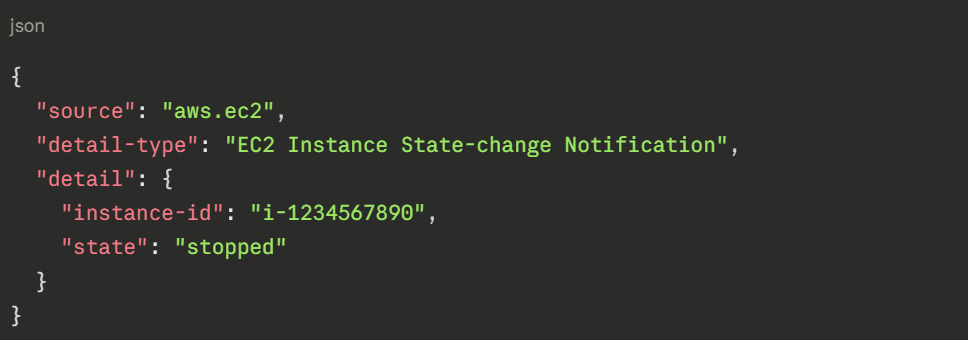
An event is a JSON message that describes something that happened.
Every AWS service that integrates with EventBridge automatically publishes events when something changes — an EC2 instance starts, an S3 object is created, a CodePipeline stage fails, an IAM policy changes.
A typical event looks like this:
Event Bus
An event bus is the channel through which events flow.
EventBridge has three types:
1. Default event bus: Receives events from AWS services automatically. Every AWS account has one.
2. Custom event bus: Create this to receive events from your own applications. Your microservices publish custom events here.
3. Partner event bus: Receives events from third-party SaaS providers — Shopify, Zendesk, GitHub, Datadog, and others — directly into your AWS account.
Rules
A rule watches the event bus for events that match a specific pattern. When a match is found, the rule routes the event to one or more targets.
A rule has two parts:
1. Event pattern: The filter that defines which events to match. For example, match all EC2 state-change events where the new state is "stopped".
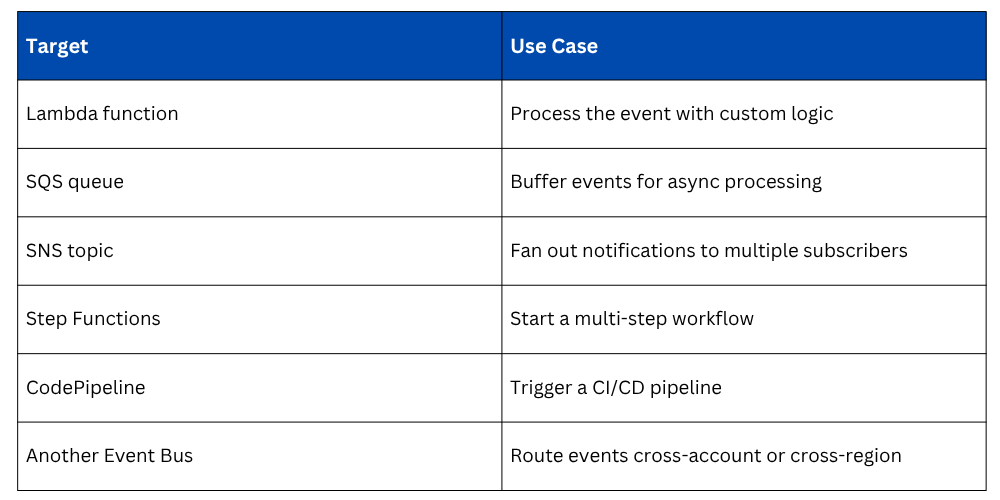
2. Target: Where to send the matching event. A Lambda function, an SQS queue, an SNS topic, another event bus, a Step Functions workflow, and more.
Targets
A target is the destination for a matched event. One rule can route to multiple targets simultaneously. Common targets:
Scheduled Events — Replacing Cron Jobs
One of the most practical uses of EventBridge is scheduling. Instead of managing cron jobs on servers, you create a schedule rule in EventBridge that triggers a Lambda function at a defined interval.
Examples:
1. Run a database cleanup function every night at midnight.
2. Generate and email a weekly report every Monday at 8 AM.
3. Check for unused AWS resources every hour and alert the team.
4. Rotate API keys every 30 days automatically.
Schedules use either a fixed rate, every 5 minutes, every 1 hour — or a cron expression for more precise timing. The targeted Lambda function runs automatically with no server needed.
Real-World Automation Patterns
1. Infrastructure Event Response: When an EC2 instance unexpectedly stops, EventBridge detects the state change and triggers a Lambda function that sends an alert to Slack, logs the incident, and attempts to restart the instance — all automatically, with no human involvement needed.
2. CI/CD Pipeline Triggers: When a new image is pushed to ECR, EventBridge detects the push event and automatically triggers a CodePipeline execution to deploy the new version. No manual pipeline trigger needed.
3. Cross-Account Event Routing: Large organisations use multiple AWS accounts — separate accounts for dev, staging, and production. EventBridge can route events from one account's event bus to another, enabling centralised monitoring and automation across accounts.
4. Security and Compliance Automation: When CloudTrail detects a sensitive IAM change — a new admin policy attached, MFA disabled on a root account — EventBridge routes the event to a Lambda function that immediately reverts the change and alerts the security team.
EventBridge vs. SNS vs. SQS
These three services are often confused. Here is a clear distinction:
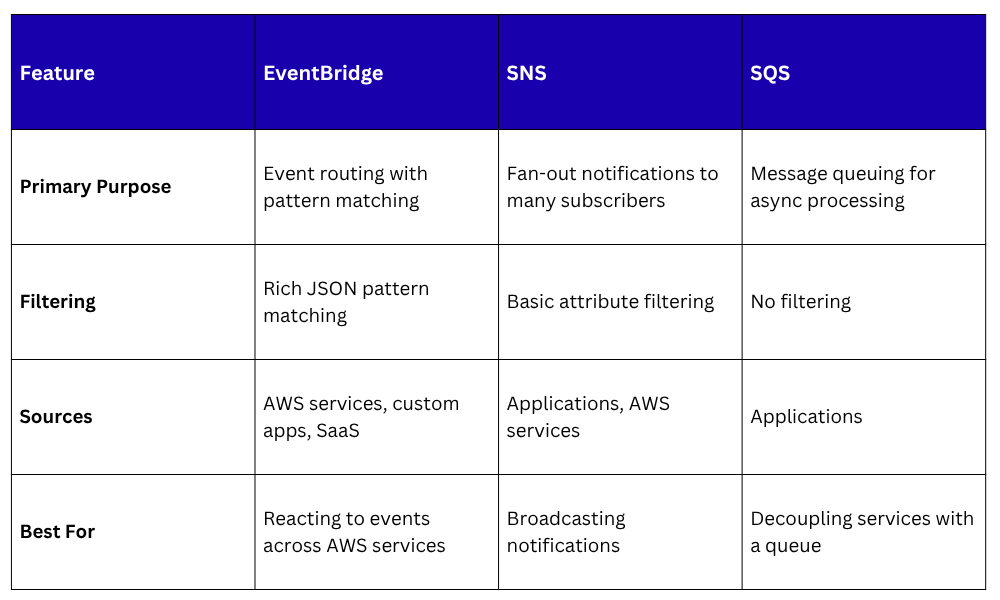
Use EventBridge when you need intelligent routing based on event content. Use SNS when you need to broadcast a message to multiple subscribers. Use SQS when you need to queue work for async processing.
